A resident leaves a voicemail at 7:12 a.m.: “There’s water under the kitchen sink again. I put down some towels, but it’s getting worse.”
Before anyone can act, the maintenance team still needs the property and unit, the source of the water, permission to enter, and enough context to decide what happens next. At a single building, an experienced coordinator may fill those gaps from memory. Across a portfolio—with requests arriving through portals, email, phone, text, and onsite staff—that approach becomes slow and inconsistent.
This is where property management workflow automation earns its keep. It can collect the request, organize the details, identify what is missing, and place the issue in front of the right person. It should not quietly diagnose the leak, declare an emergency, approve a work order, or dispatch a vendor.
The useful dividing line is simple: automate information handling; keep accountable decisions with people.
What property management workflow automation actually means
Workflow automation moves repeatable work from one step to the next using rules, integrations, and software. In property operations, that can mean:
- Capture a request from an approved channel
- Check whether required details are present
- Put the information into a consistent format
- Send an acknowledgement
- Route the request to the right queue
- Remind the team when an item has not moved
- Send an update after a confirmed status change
That is different from handing an entire process to software.
Good automation removes copying, sorting, rekeying, and chasing. It gives the team a cleaner starting point. It does not need to make every judgment inside the workflow—especially in maintenance, where the wrong assumption can affect resident safety, repair costs, vendor response, and the condition of the property.
Start with the work that slows the team down
The best candidates for automation are frequent, predictable tasks with clear inputs and handoffs.
Maintenance request intake
Residents describe the same problem in many ways. “The heat is broken” might mean the entire unit is cold, one radiator is not working, or the thermostat display is blank. Before a coordinator can route the request, someone has to turn that description into usable information.
Automation can collect and structure details such as:
- Property and unit
- Affected room, fixture, or equipment
- When the issue started
- Whether water, heat, electricity, security, or access is involved
- Photos and attachments
- Permission to enter
- Resident availability
The output should be a better intake record, not an automatic maintenance decision.
Resident acknowledgements and follow-ups
Residents need to know their request arrived. A standard acknowledgement should not wait until a coordinator has time to open the message.
A workflow can also ask a specific, approved follow-up question: “Is water still flowing?” or “Please confirm your unit number.” It should not promise an arrival time or repair outcome the team has not confirmed.
Data entry and status updates
Copying the same information between email, spreadsheets, and a property management system adds no value. Automating that transfer reduces omissions and gives staff more time for exceptions.
When those handoffs cross Yardi, MRI, RealPage, an ERP, or a reporting platform, the workflow also depends on reliable property management software integrations. Automation cannot create a consistent process if the underlying systems exchange incomplete or mismatched records.
The same applies to status messages. Software can notify a resident after a request is assigned or an appointment is confirmed. It should not infer that a repair is complete simply because the scheduled time has passed.
Follow-up queues and reporting
Automation can surface requests that have not moved, records missing a completion note, or repeated issues at the same unit. Instead of scanning every open item, a manager can start with the exceptions.
Decide the role of automation at each step
Not every step belongs in the same bucket. A practical workflow separates actions that can run automatically, tasks where AI can assist, and decisions that need an accountable person.
| Workflow step | Recommended role | Why |
|---|---|---|
| Preserve the original request and attachments | Automate | The source record should never depend on manual copying. |
| Extract the property, unit, issue, and access details | AI assists | Unstructured messages can be organized, but the result remains reviewable. |
| Request missing standard information | Automate with approved rules | Questions should be narrow and pre-approved. |
| Highlight possible urgency signals | AI assists | Signals help prioritize review; they are not a final classification. |
| Set the maintenance priority | Human decides | Context, policy, and accountability matter. |
| Diagnose the problem | Human decides | A resident description is not a technical inspection. |
| Approve or create the work order | Human decides | This prevents duplicates, bad assignments, and unnecessary cost. |
| Select and dispatch a vendor | Human decides | Contracts, access, availability, and spending authority affect the choice. |
| Send a confirmed status update | Automate | The message follows a verified event in the system of record. |
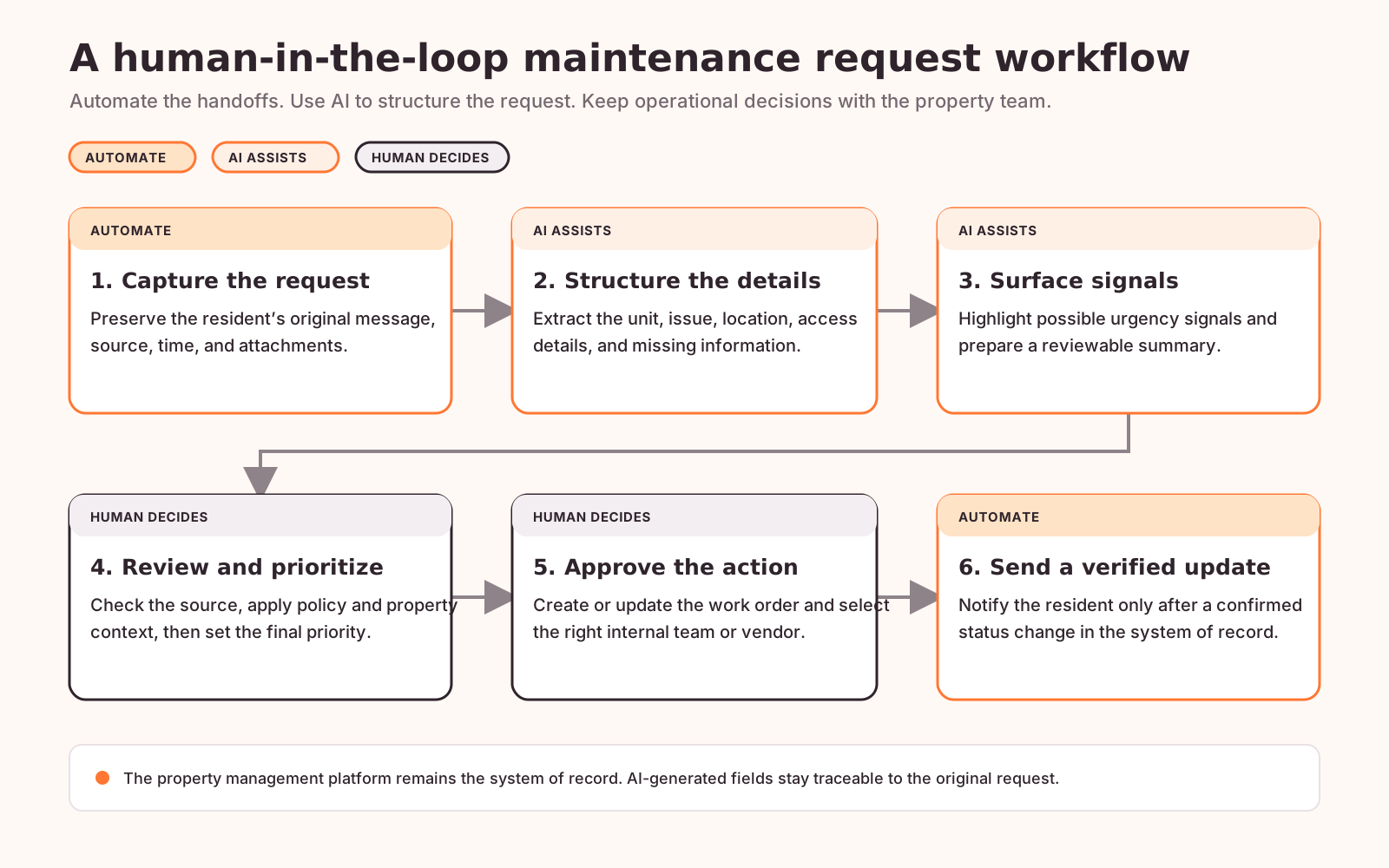
The table defines who owns each decision. The workflow below shows how those roles connect from the original resident request to a verified update.
Where AI helps—and where it can mislead
Rules work well when information is already structured. Maintenance intake rarely is. AI is useful because it can read everyday language and turn it into a consistent draft record.
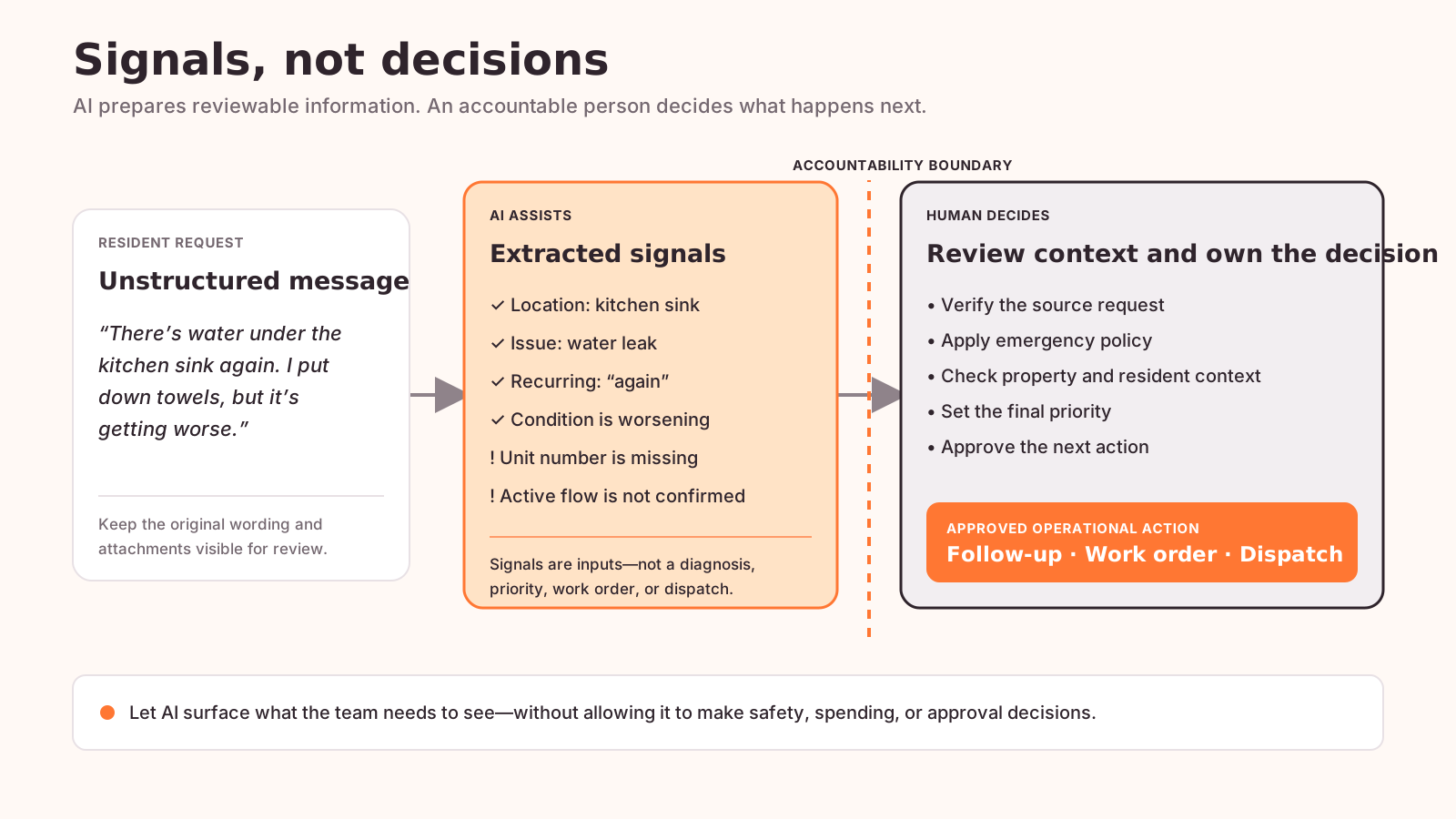
Return to the leaking-sink message. A model can extract “kitchen sink,” recognize that the problem is recurring, and flag “getting worse” as a reason for prompt review. It can also notice that the message does not identify the unit or confirm whether the water is still flowing.
Those are useful signals. They are not a diagnosis or an emergency classification.
The water could come from a supply line, drain, disposal, dishwasher connection, or another unit. A confident-looking summary does not change that uncertainty. Staff should be able to see the resident’s original words and attachments alongside any extracted fields.
A practical AI-assisted maintenance request intake example shows how unstructured requests can become reviewable operational signals without allowing the model to create work orders or trigger critical actions on its own.
Five decisions that should stay with the property team
1. Is this an emergency?
Urgent wording is not always an emergency, while a casually written request may describe a serious risk. AI can flag water, smoke, sparks, no heat, gas, failed locks, or loss of access. The final classification should follow company policy and belong to someone authorized to make it.
2. What is the diagnosis?
Neither the resident’s description nor a generated summary is a technical diagnosis. Inspection and professional judgment determine the repair.
3. Should a work order be created?
Automatically converting every message into an approved work order can produce duplicates, wrong trade assignments, and avoidable dispatch costs. Intake can prepare the record; the team decides whether to create, merge, update, or reject it.
4. Who should be dispatched?
Vendor availability, insurance requirements, service agreements, access restrictions, repair history, and approval limits all affect the answer. These factors rarely fit a single routing rule.
5. What safety, spending, or liability action is appropriate?
Automated messages should never improvise instructions for electrical problems, gas smells, flooding, fire risks, or other dangerous situations. Use approved emergency language and escalation paths. The same caution applies to resident responsibility, warranties, insurance, owner authorization, and spending approval.
A workable human-in-the-loop maintenance flow
The process does not need to be complicated:
- The resident submits a request through an approved channel.
- The system preserves the original message and attachments.
- AI extracts available details into standard fields.
- Missing information and possible urgency signals are highlighted.
- The resident receives an approved acknowledgement or focused follow-up question.
- A coordinator reviews the source request and structured summary.
- The coordinator sets the priority and next action.
- An authorized user creates or updates the work order.
- The property management platform remains the system of record.
- Managers review exceptions, response times, and intake quality.
This design removes repetitive work without hiding decisions inside a model. If someone later asks who classified the request or approved the dispatch, the answer is visible.
Before you automate a workflow, ask these questions
Use this checklist with the coordinators, property managers, and maintenance leads who handle the process today:
- Is the current process consistent? If every property follows different steps, agree on the workflow and exceptions first.
- What information is actually required? Separate must-have facts from helpful details.
- Which steps follow a rule, and which require judgment? “Ask for a missing unit number” is a rule. “Dispatch an emergency plumber” is a decision.
- What happens when information is incomplete or contradictory? Manual review is a valid outcome. The system does not have to guess.
- Can reviewers see the source? Keep the original message, photos, and attachments next to generated fields and summaries.
- Who owns the next action? Every consequential step needs a clear, accountable role.
- How will you measure improvement? Track intake completeness, time to first review, follow-up volume, corrections, duplicate requests, and exceptions—not just how many steps ran automatically.
Common mistakes that create more work
Starting with software instead of the workflow is the first. A tool cannot resolve unclear ownership or inconsistent escalation policies.
The second is designing only for the happy path. Real maintenance queues contain duplicate requests, missing unit numbers, conflicting descriptions, unavailable vendors, access restrictions, and after-hours exceptions.
The third is treating polished text as verified information. A generated summary may sound certain even when the resident’s message is ambiguous. Keep uncertainty visible.
The fourth is automating too much at once. Start with a narrow step—such as structuring intake—and review accuracy, staff adoption, response time, correction rate, and exceptions before expanding.
If the maintenance workflow is part of a broader AI initiative, use a staged implementation plan rather than starting with the model. This practical guide to implementing AI in business processes covers the wider sequence from defining the business problem through integration and performance review.
READY TO IMPROVE THE WORKFLOW?
Automate the repetitive work—without handing critical decisions to software
Setronica can help map your maintenance intake, system integrations, review points, and approved escalation rules.
Better information, clearer accountability
Property management workflow automation is most valuable when it helps the team act on better information with less administrative effort.
For the leaking-sink request, that means the coordinator receives the original message, a structured set of details, clearly marked missing information, and a visible signal that the situation may be worsening. The coordinator still decides the priority, whether to create a work order, and who should respond.
That is the practical boundary for AI in property operations: let it collect, organize, and surface signals. Keep safety, spending, approval, and accountability in human hands.


